![Full logo.png]](https://helpdesk.getpinch.com.au/hs-fs/hubfs/Full%20logo.png?height=40&name=Full%20logo.png)
Xero offers a hosted payment page for third-party integrators to connect into. To configure this in Pinch, head to the Xero Config page. This page allows you to configure which of your Xero branding themes (Invoice Templates) Pinch is enabled for Pay Now.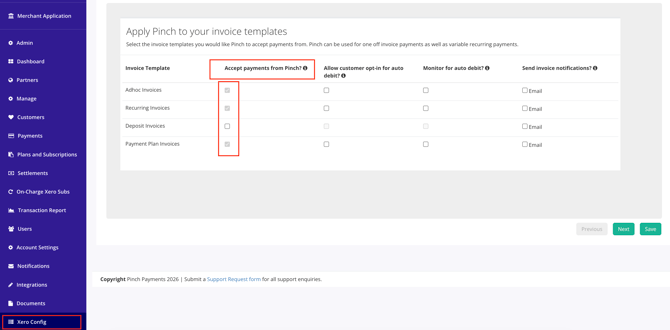
Please ensure you hit save once you have selected which branding-theme you wish Pinch to be the default payment gateway on. This will automatically apply the Pinch Pay Now link to the invoice issued, and PDF Xero invoice for your client's convienience.
Important Note:
Branding Themes:
Xero only supports one active payment gateway per branding-theme. This is to ensure multiple payment gateways are not attempting to offer their payment options, or debiting the same invoice across multiple systems.
Overwriting Themes:
If you have previously configured another payment gateway with Xero, applying Pinch to the same theme will overwrite the existing gateway. The same is true in reverse, with other systems able to overwrite Pinch as the default theme for payment. Please be mindful when changing gateways.