Connecting your account to Xero:
Once you have been provided access to your Pinch account . Simply log into your account, and navigate to the Integrations tab. You will see multiple accounting system options, however Xero is the only currently supported Onboardme connection. Proceed by clicking the Xero option and logging into Xero, ensuring you select the correct organisation and tenant if you are an admin of more than one. 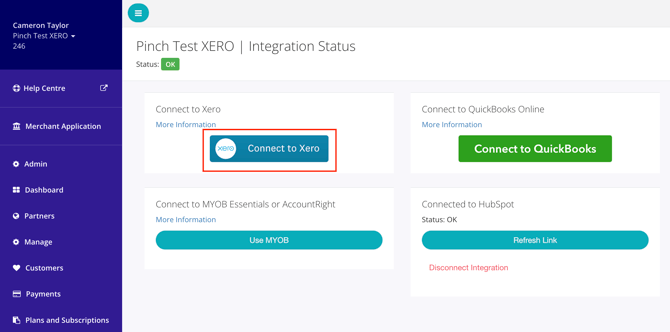
Once this is completed, the status of your connection will change to "In Progress" which will take a few minutes to sync contacts and invoices. Once this changes to "ok" you are done.
Important Notes:
Normal Pinch account configurations must also be completed, so please ensure the following things are actioned once you have connected your Xero tenant. We have a handy video guide on what settings require configuration to ensure you don't miss any here: Perfect Pinch OnboardMe Setup
1. Ensure you apply Pinch as the payment gateway on the invoice templates (branding themes) from the Pinch Xero Config page and click save in the bottom right. This is to ensure Pinch is your default payment gateway, and that invoices are configured to automatically be debited on your selected templates. See image below. 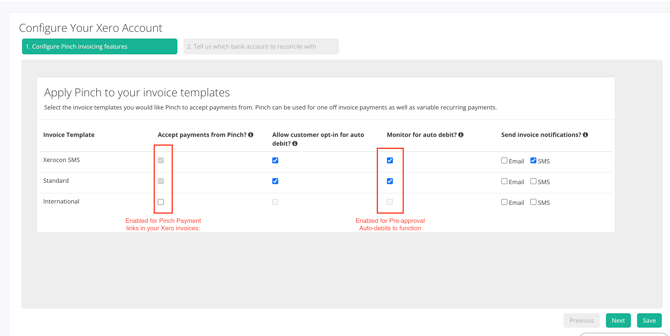
2. Ensure you complete your Account Settings tabs. This is important for payment options, reattempt behaviour and email configuration.
English
![Full logo.png]](https://helpdesk.getpinch.com.au/hs-fs/hubfs/Full%20logo.png?height=40&name=Full%20logo.png)