![Full logo.png]](https://helpdesk.getpinch.com.au/hs-fs/hubfs/Full%20logo.png?height=40&name=Full%20logo.png)
Overview:
There are 3 essential components that allow Pinch to automatically debit your clients once they have signed a proposal in the Onboardme platform. These are and will be unpacked separately in their own sections below.
Essential Pinch Xero Configuration Settings (Branding themes)
A stored payment method via Onboardme Proposal
Pinch Auto-debits the invoice and manages the reconciliation.
The end-to-end flow:
1. Create a proposal
2. Client signs the proposal and stores their Card or Bank account (Pre-approval in Pinch)
3. Based on your Branding themes, Pinch will either schedule the invoice for debit or ignore it.
4. Pinch executes the debit on the due date
5. Payment created against the invoice, and marked as Fully paid, or Partially paid
6. Settle the merchant's (you) funds, and provide automated reconciliation 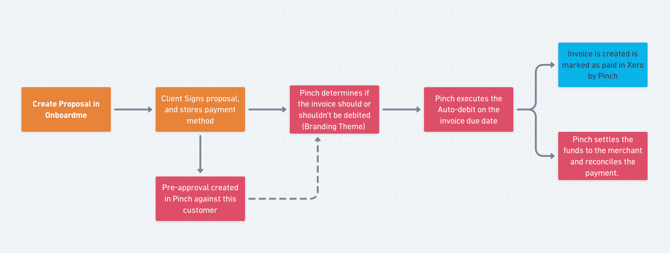
Let's unpack each of these to ensure you know what is required to make this flow work seamlessly and consider how you can modify this to suit your needs.
Essential Pinch Xero Configuration:
A helpful setup guide video is here for you to follow: Perfect Pinch OnboardMe Setup
This is an essential step, and part of Pinch's standard setup process. If this is missed, no invoices will auto-debit. To enable the autodebit flow, ensure you apply Pinch as the payment gateway on the invoice templates (branding themes) from the Pinch Xero Config page and click save in the bottom right. This is to ensure Pinch is your default payment gateway, and that invoices are configured to automatically be debited on your selected templates. See image below. 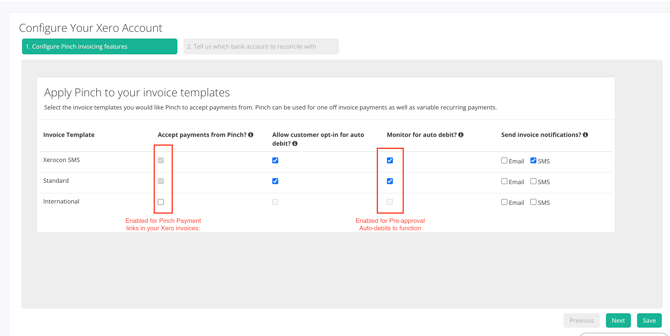
Pinch checks each invoice synced into our system (from Xero directly or via Onboardme) to determine whether we should auto-debit based on these settings. This is the most commonly missed configuration and will prevent auto-debits from processing. If you don't wish for invoices to be auto-debited based on your business needs, this is OK, and you can disable the themes accordingly and instead manually process the payment via a "merchant initiated debit" which you can find instructions for here.
Storing a payment method by signing a proposal in Onboardme:
Without a stored payment method, we don't have the details to charge your client for their invoice(s). When a payment method is stored in Onboardme, this creates a Pinch Pre-approval in the Pinch platform. This Pre-approval activation sends an email to your client, which provides them a link in the event they need to cancel at any time.
When building your proposal, you can configure whether to enforce a stored payment method, which appears as such in the OM platform. Clients can select from cards or direct debit bank account when chosing how they wish to pay for services. .png?width=670&height=537&name=image%20(21).png)
Once the proposal is signed, the client will receive their Pre-approval activation confirmation from Pinch. Now that we have a saved payment method for this customer, the Pinch x Onboardme magic can happen. Let's talk next about what Pinch does to auto-debit.
Pinch automatically debits the invoice, and records this as paid (Including reconciliation)
Pinch's autodebits happen in two stages. The first step is to check if the invoice is associated with someone with a pre-approval, and if this pre-approval exists, then we next check to ensure that the branding theme the invoice is built on has the Auto-debit function enabled. With both of these checks completed, Pinch has now scheduled this invoice to be automatically debited on the due date of the invoice*. This can be same-day or at any time in the future to ensure the debit goes through smoothly. When debited, Pinch sets the invoice as paid or partially paid, records a payment against the invoice, and records the amount awaiting settlement in the Pinch Clearing account in your Xero file, ready for automatic reconciliation.
*Important note: Pinch does not automatically debit invoices that have due dates in the past, as we assume these to be incorrectly dated or to require you to manually trigger the debit via the merchant-initiated process to avoid poor client experience.
Summary:
With all of those essential components correctly configured, client proposals and autodebits will be a breeze, and flow as they were design between Onboardme and Pinch! If you encounter any issues with auto-debits, first check that the Auto-debit is enabled on the branding theme and that the client does have a pre-approval. These are the most common issues with auto-debits not occurring, and we have an article helping you troubleshoot these individually.